How machine learning works in Mobile Fingerprint sensor
Fingerprint method of identification is the oldest and widely used method of authentication used in biometrics. There are several reasons like displacement of finger during scanning, environmental conditions, behavior of user, etc., which causes the reduction in acceptance rate during fingerprint recognition. We are identified by using the traits and unique characteristics.These are our physiological responses.These characteristics can be features such as facial expressions, iris patterns, voice, and even fingerprints.Fingerprint-based authentication is the most popular one.Fingerprints have different patterns that make each individual fingerprint unique.
It uses an ultrasonic scanner instead of an optical one. Ultrasonic sensors work using ultrasound to build up an image of your fingerprint (yes, really) and work better with messy fingerprints – if your hands are wet or oily with sun cream, for example. They’re essentially ‘Face ID for your finger‘
Can fingerprint scanners be beaten?
The report says a fingerprint scanner can be “hacked” by using a picture of the target’s fingerprint, creating a negative in Photoshop, printing the resulting image, and then putting some wood glue on top of the imitated fingerprint so it can be used to trick many commercial scanners.
As so many conditions and factors play an important role in determining the final ridge pattern, we consider fingerprint patterns to be unique to each and every individual.
Fingerprints can be considered as a pattern of ridges and valleys. Its classification and verification is pattern based problems.Optical images of fingerprints can be classified based on the details of its ridge configuration.
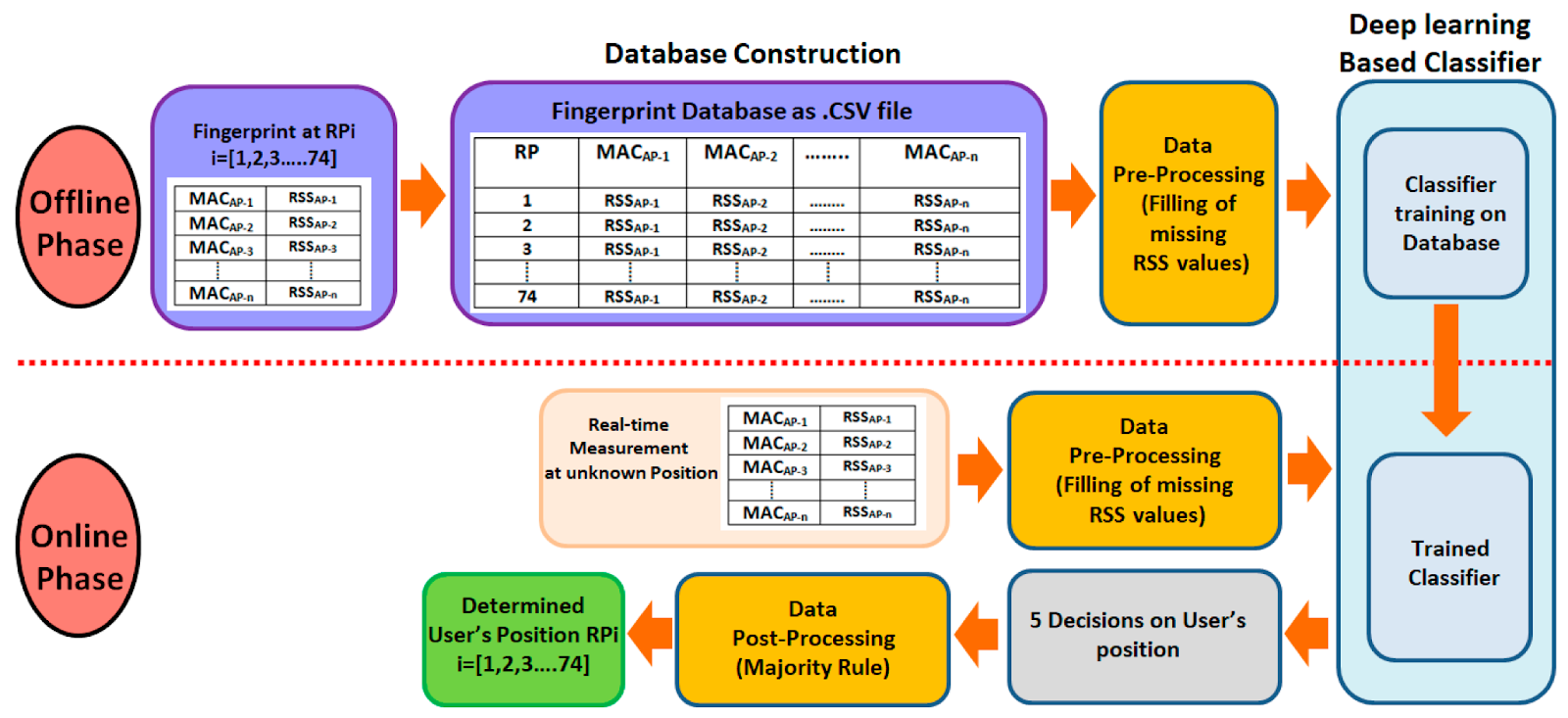
The optical input that is captured from the fingerprint sensor is stored and accessed by the system in specific formats (e.g. .bmp, .jpeg, etc.) and we are using these captured inputs to train our neural network.
Some of the verified approaches to implement fingerprint:-
1)Pre-Classifier Convolution Neural Network
2)Data Samples
3)Inception Model
Conclusion:-
We use Machine Learning algorithms and its improvised version of technologies as a pre-verification filter to filter out bad or malicious fingerprints.The inception model is used for filtering out bad fingerprints.If the output of the inception model says that it is a good fingerprint, it is given to the verification module where matching of the fingerprint is performed.
Python Certification can also mean that you have taken the appropriate courses to learn the language and how to write code with it. Training in Python helps you master all concepts within the sphere such as writing code and using related packages such as Pandas, SciPy, NumPy, the Lambda function, and using web scraping libraries.
Python certification online means you have credentials that prove you know your stuff when it comes to Python. However, it’s not always enough to just have this certification. When applying for work, you also have to be able to back up your certification with experience, demonstrable skills, and perhaps a portfolio.
What are the Advantages of a Python Certification?
Getting a certificate in Python allows you to prove your expertise in the language. It is an achievement that can potentially help you get better job opportunities in the future since it provides a reliable benchmark of your knowledge and skills on this subject. Certification also helps you stand out amongst the many applicants that might be vying for the same position.
Professionals who have earned their certifications may also be able to negotiate for better salary packages.
How Do You Get a Python Certification?
Earning your certificate is quite simple. First and foremost, you would have to learn the language. The need for Python programmers is growing yearly. This high-level programming language is well-liked for a reason.
ONLEI Certified Entry-Level Python Programmer
The ONLEI Certified Entry-Level Python Programmer certification gauges a candidate’s ability to accomplish coding tasks about the programming essentials in Python. A ONLEI Certified Entry-Level Python Programer certification holder has:
Ample knowledge of the fundamental concepts of computer programming
Good understanding of the syntax and semantics of the Python programming language
The skills to resolve typical implementation challenges using the Python Standard Library
A ONLEI Certified Entry-Level Python Programmer certified individual has gained knowledge of all the fundamentals of Python to study the programming language at the intermediate level and then move on to exploring it as a career avenue on the professional level. It is the best certification for python as a beginner.
ONLEI Certified Associate in Python Programming
Aside from building confidence in the candidates about the programming skills, the ONLEI Certified Associate in Python Programming certification also helps them to stand apart from the herd in the job market when it comes to Python programming.
The ONLEI Certified Associate in Python Programming certification offers individuals a head start for moving on to the professional level in Python programming. ONLEI Certified Associate in Python Programming certified professional is:
Able to understand and work with the fundamental notions and techniques employed by object-oriented programming
Capable of accomplishing coding tasks in Python
Familiar with the:
General coding techniques
General computer programming concepts
Object-oriented programming
Python runtime environment
Syntax and semantics of Python
ONLEI Technologies certification ensures that the holder is entirely familiar with the Python programming language for advancing in the Python programming language and to embark on the journey of becoming a competent Python developer.
ONLEI Certified Professional in Python Programming
The ONLEI Certified Professional in Python Programming certification gauges a candidate’s ability to:
Accomplish coding tasks related to advanced programming in Python and related technologies
Apply advanced OOP notions and techniques
Create tools, frameworks, and complete systems
Understand and deal with the GUI programming and network programming
Work with Python libraries and modules
Python developers are in high demand – not only because the language is so popular and widely used but mostly due to the fact that Python became a solution in many different areas. From web applications to data science and machine learning.
Hi Guys we are going to learn about IDE. Which IDE is best for Python (Python IDE for Development).
Using an Integrated Development Environment (IDE) is the best way to build in Python. They not just make your work a lot more straightforward as well as consistent; They also make coding easier and more effective.
Yes, this is known to everyone. But the problem is that there are so many options, so how do you choose the best development environment? Is there a Python editor that is superior to others? Such concerns frequently become a problem for novice developers. However, in order to select the best one, you need to know what you want to accomplish with it and why you need it.
In this article, we’ll give an outline of the best IDEs for Python that are well known among coders and a couple of different choices that merit consideration. However, before we begin, let’s define what an IDE is.
What is an IDE ? Why do you need it ?
Developers use a software package called an Integrated Development Environment to create programs. By combining straightforward user interfaces with components that are closely related, it aims to improve a programmer’s productivity. It is, in essence, a tool that simplifies the process of creating, testing, and debugging source code. Simply put, an IDE takes care of all the routine so you can concentrate on more pressing matters.
The following are some useful Python IDE tools:
A text editor
A compiler
A interpreter, or other automation tools
debugger
The IDE is the primary tool for working with code, so choosing one is critical. It is of incredible assistance both for composing and understanding code. A developer should select an IDE based on its capabilities and intended functions. When looking for the best text editor for Python development, keep these things in mind:
Based on the tasks performed, usability
For example, code route, code variety styles, and auto-complete.
Functions & Service Support
They are dependent on the requirements of the specific developer or project. One might want a syntax highlighter for particular languages, while another might want a testing system, debugger, version control, docker integration, terminal access, and so on.
Speed of opening an IDE or Code Editor
In the event that an IDE is highlight rich yet ineffectively enhanced, it will send off, process, and autocomplete code gradually, which is a tremendous deficiency.
Ecosystem
An IDE for Python must regularly update its versions with new features and bug fixes. The user community is also important because it enables real-time communication with the developers, feature enhancement suggestions, and feedback. The product needs to remain up to date and continuously improve, which is nearly impossible with a missing community, even though it is not what all developers do as users. If you don’t, you run the risk of being constrained by an out-of-date version, a particular technology, or an entire language version that is not supported.
System of plugins
Over 90% of a developer’s requirements are typically met by an IDE’s fundamental capabilities. Third-party plugins are used to accomplish the remaining tasks.
Price. There are a few choices to make: a free version of a proprietary product, an open-source IDE, a subscription, and a one-time payment. In this case, the value of money is decided by each developer or business. As a result, when selecting the best Python IDE for Mac, Windows, or Linux, consider both the features you want and your budget.
A code editor seems to be the same thing as an integrated development environment.
What is a Code Editor ?
A text editor that emphasizes syntax and formats the code is called a code editor. Code can be made and changed with advanced code editors.
What similarities exist between IDEs and code editors? Developers are able to:
Scripts can be stored, reopened
Run their code on it
Syntax can be highlighted
List of Best Python IDEs for Machine Learning and Data Science
Using a variety of scientific techniques, data sets are studied, comprehended, and various inferences are drawn in the field of data science. Python is an excellent language for both data science and machine learning due to its popularity and ease of use in statistical analysis management. Python is appropriate for the two fields since it likewise contains various instruments for AI, normal language handling, information representation, information examination, and so on. The accompanying rundown incorporates a rundown of the best Python IDE for information science and AI.
Spyder
Scientific Python Development Environment (Spyder) is a Python IDE that is free and available as open source. It is light and a great Python IDE for data science and machine learning. Numerous data analysts use it for real-time code analysis. You can use Spyder’s interactive code execution pattern to compile a single line, a portion of the code, or the entire code at once.
Using Spyder’s static code analysis feature, you can find redundant variables, errors, and syntax issues in your code without having to compile it. Additionally, it is integrated with numerous DS packages, including IPython, Pandas, NumPy, and SciPy. to help you in doing information examination.
JupyterLab
JupyterLab is a web-based python IDE for professionals in DS and machine learning. With the help of JupyterLab’s interactive output system, you can test your code as you write it. The connection point of JupyterLab is very great as it gives you a concurrent perspective on the terminal, content manager, control center, and record index.
Autosave, auto-formatting, and code completion, among other features make it one of the most effective free Python IDEs for professionals in ML and DS. There is a harmony mode in JupyterLab which permits clients to limit interruptions, unrequired screens, and spotlight on the task under process. The JupyterLab-created files can be downloaded in a variety of formats, including.py,.pdf, and so on. Additionally, you can download them as slides (.png) format.
PyCharm
It is a magnificent python IDE which has highlights like auto code fulfillment, auto code space, and so forth. It has an intelligent debugger that looks at the code and shows errors. PyCharm is also preferred by professionals in DS and ML who work in web development due to its straightforward user interface. PyCharm’s navigation feature lets you search for any particular symbol used in long codes. PyCharm also makes it simpler to link multiple scripts together.
With PyCharm’s refactoring feature, you can easily restructure your code by changing the method signature, renaming the file, and extracting any method in the code. ML experts utilize coordinated unit testing to test their ML pipelines.
Visual Code
Professionals in ML and DS use Visual Code, one of the most popular Python IDEs. It is compatible with Linux, Windows, and Mac operating systems. In addition to Python, VS Code is compatible with C, C#, JavaScript, HTML, CSS, and other languages. There is a free and a paid version of the open-source Python IDE Visual Code for businesses and enterprises.
It is also a good starting point because VS Code provides guidance whenever you create classes or functions. Users can also save time while coding with the auto code completion feature. Additionally, PyLint, which checks for errors in the source code, is integrated into VS Code. Using VS Code, you can easily carry out unit testing on your ML or DS models.
Any small Python code’s quick results can be seen in a separate window thanks to the REPL (read, evaluate, print loop). When experimenting with a new API or function, it is extremely helpful.
Working with SQL, Unity,.NET, Node.js, and many other tools is made easier with VS Code. A file can be renamed, methods extracted, imports added, etc. using the VS Code refactor in your code. For ML and DS, VS Code is an excellent IDE that makes it simple to optimize and debug code.
Which Python IDE is important for you ?
Since it has become so obvious what to search for in a Python improvement climate, we should pinpoint what to consider to pick the best one in this short agenda. Consider the following:
Platforms
Does this Python editor work with the language version and platform you’re using?
Updating
Is it regularly updated? If so, how frequently are the updates updated?
Features
Is it equipped with all of the features you require for your work?
Plugins
Can plugins make up for the lack of certain expected features in the Python code editor you prefer?
Payments
Does the license come with a cost? Check to see if either you or your business is willing to pay for it. It’s also important to find out if you’ll have to pay for future versions of this
IDE, which is common with single-payment products.
Trials
Have you tried using it? You can explore the editor and decide for yourself during the trial period provided by most subscription or payment-based editors.
Conclusion
We have investigated a rich assortment of the best Python IDEs and different devices. One’s level of proficiency and convenience determine which tool to use. Naturally, some IDEs, like PyCharm, remain popular due to hard-to-find features; however, you can always try a few other tools to see which ones work best for you. For instance, if you are just getting started, you might want to start with Sublime or VS Code. Jupiter may be more convenient for a project with additional details, such as scientific research with numerous graphs.
While some IDEs are more professional, others are better for beginners; Each of them has its own design and features. This list has been compiled to provide you with a variety of options.